
The Document Inspector

Before you share, publish, or hand off a document, it is important to know exactly what is inside it. Open Publisher files can silently accumulate hidden metadata, stray off-canvas objects, and invisible text boxes that you may not want recipients to see – the Document Inspector is a privacy and security tool that finds and removes all of it in one place, before the file leaves your hands.
Opening the Document Inspector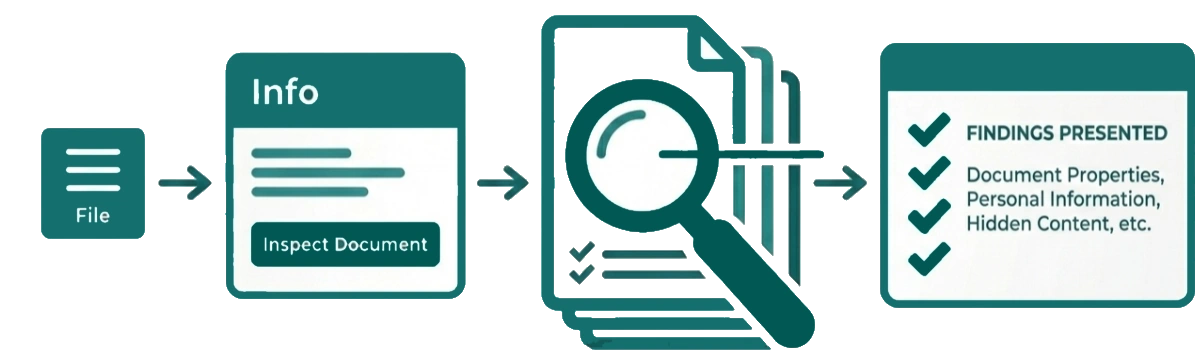
Go to File > Info > Inspect Document. The Inspector immediately scans your entire document across all pages and presents its findings.
What the Inspector Checks
The Inspector scans three categories of potentially sensitive or unwanted content:
-
Document Properties – Checks for embedded metadata such as Author, Company, Subject, and Keywords. This metadata is invisible in the design but travels with the file – useful to strip before sharing externally so personal or company information is not unintentionally exposed.
-
Off-Canvas Elements – Detects elements that exist completely outside the page boundary – stored in the Scratch Area or accidentally dragged off-page. These objects are invisible in your printed or exported output but are still present inside the file and visible to anyone who opens it in Open Publisher.
-
Empty Text Boxes – Flags text boxes containing only whitespace or invisible HTML entities such as . These are easy to leave behind and can bloat file size or expose placeholder content.
Status Badges & Removing Data
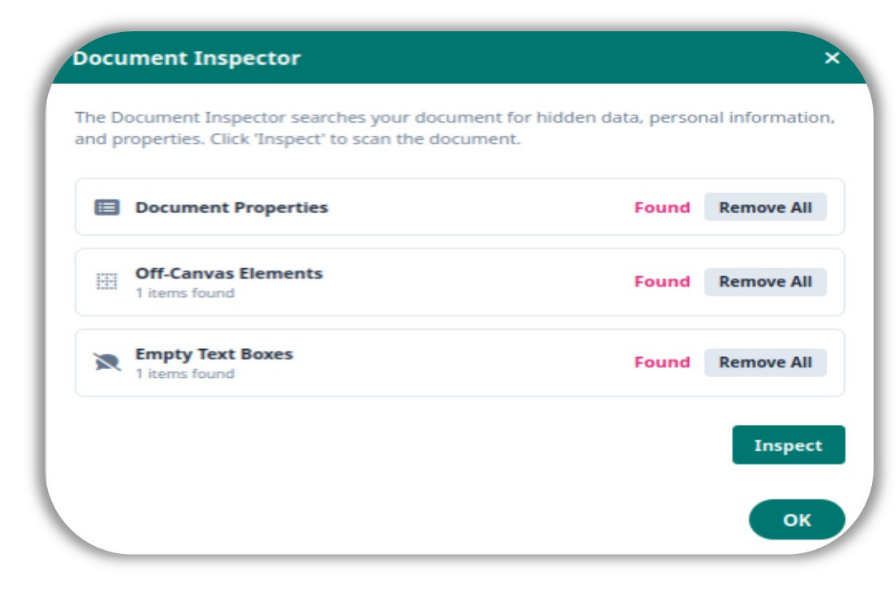
Each category displays a colour-coded status badge:
-
Found – Data was detected and requires your attention.
-
Clean – Nothing to report in this category.
A one-click Remove All button is provided for each category, allowing you to instantly purge the detected data without having to locate and delete items manually. Running the Inspector before every export or file handoff is a good habit for keeping your documents clean and your sensitive information private.