
Grid Guides
Grid Guides overlay a regular pattern of intersecting lines across your canvas, giving you a precise visual reference for aligning elements and maintaining consistent spacing throughout your layout. The grid is non-printing – it is only visible in the editor and never appears in your exported or printed output.
Opening Grid Guide Setting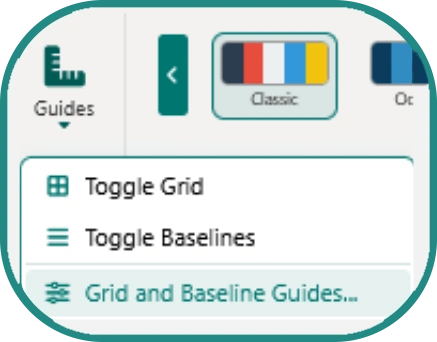
-
Go to Page Design > Guides > Grid and Baseline Guides.
-
The customisation modal opens as a draggable window so it can be repositioned while you preview changes on the canvas live.
What You Can Customise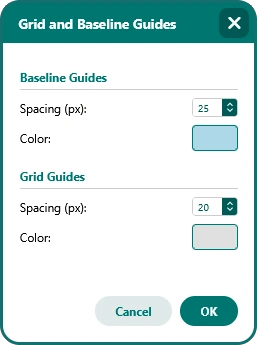
-
Grid spacing – Set the distance between grid lines to any value that suits your layout. Tighter spacing gives you greater precision for positioning small elements; wider spacing works well for block-based, modular layouts.
-
Grid colour – Change the colour of the grid lines to something that contrasts clearly against your page background without becoming visually distracting during design work.
Locking & Clearing Guides

-
Lock Guides – Freezes all guides in place via
Page Design > Guides > Lock Guides, preventing accidental movement during active design work. -
Clear Guides – Removes all placed guides from the canvas instantly via Page Design > Guides > Clear Guides.