
Text Fit: Best Fit

Say goodbye to the tedious trial-and-error of manually guessing point sizes. Text Fit: Best Fit is a powerful layout tool that automatically scales your font size up or down so that your text fills its container exactly. Instead of repeatedly highlighting text and tweaking the size until it looks somewhat right, Open Publisher mathematically calculates the optimal font dimensions for your specific text box and applies it instantly with a single click, perfectly balancing your text within its boundaries.
How to Use Text Fit
Applying the Best Fit setting is quick and requires no advanced formatting menus: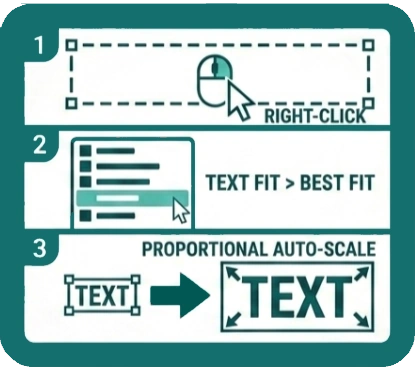
-
Right-click anywhere inside or on the border of the text box you wish to adjust on your canvas.
-
From the context menu that appears, select Text Fit > Best Fit.
The font size will adjust immediately, scaling proportionally so that the text spans both the width and height dimensions of the box as closely as possible without overflowing or causing clipping.
When to Use It

While manual text sizing is standard for regular body paragraphs, Text Fit: Best Fit is a massive time-saver for specific design scenarios:
-
Headings and titles – Perfect for front covers or article headers where you want the text to span the full width of its container at whatever size fits naturally, eliminating awkward gaps and ensuring a bold, unified look.
-
Fixed-size layout boxes – Essential when working with rigid templates, brochures, or grids where the physical box dimensions are strictly set by your overall design. In these cases, the font must adapt to fit the space provided, rather than the box stretching to accommodate the text.
-
Banners and labels – Ideal for certificates, name tags, and promotional graphics where text needs to fill the available space for maximum visual impact, regardless of whether a name or word is remarkably long or exceptionally short.
A Quick Design Tip
Because Best Fit dynamically changes the font size based on the volume of text and the size of the container, we recommend avoiding it for standard body text, especially in multi-column layouts. Using it on linked paragraph boxes can result in inconsistent, mismatched font sizes across your document, which can reduce readability. Reserve Best Fit for your standout, high-impact text elements!