
The Integrated Thesaurus

Enhance your writing, avoid repetitive language, and find the exact word you need without ever leaving your workspace. The Thesaurus is built directly into Open Publisher to streamline your editing process – meaning no more switching tabs, browsing external websites, or tedious copy-pasting. Powered by the reliable LanguageTool API, a rich library of synonyms is fetched live in real-time and can be seamlessly applied to your document with a single click.
Using the Thesaurus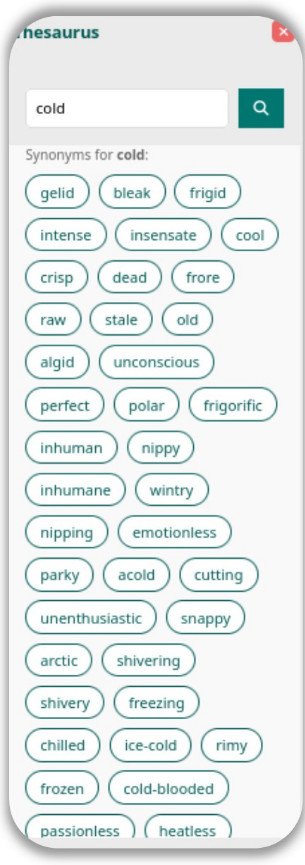
Replacing a word is designed to be quick and intuitive. Just follow these steps:
-
Navigate to your document and highlight any single word you wish to change. This works across standard text boxes, headers, footers, or within table cells.
-
Go to the top menu ribbon and click Review > Thesaurus.
-
The dedicated Thesaurus sidebar will smoothly slide out on the right-hand side of your screen, displaying a comprehensive list of synonyms tailored to your highlighted word.
-
Browse the suggestions and click any synonym to instantly replace the highlighted word in your active document.
Smart Auto-Replace
Open Publisher is designed to respect the flow and formatting of your document. When you click a synonym, our Smart Auto-Replace feature automatically preserves the original word’s capitalisation. For example, if the original word was written in Title Case or ALL CAPS, the new replacement is dynamically capitalised to match exactly. Your document’s formatting is never disrupted by a thesaurus swap, saving you from manual proofreading and corrections.
Clipboard Fallback

We’ve also built in safeguards to protect your document’s integrity. If you happen to open the Thesaurus and click on a synonym without having any text actively highlighted on the page, Open Publisher employs a handy Clipboard Fallback. Instead of attempting to replace text (which could cause errors) or inserting the word randomly, the system safely copies your chosen synonym directly to your system’s clipboard. A brief notification will appear to confirm this action, allowing you to easily paste the word exactly where you want it without risking accidental changes.
Tips for Best Results
-

Select Single Words: The Thesaurus is optimized for individual vocabulary words. Highlighting entire phrases or sentences may not return accurate suggestions.
-
Stay Connected: Because synonyms are fetched live via the LanguageTool API, ensure you have an active internet connection to load the latest suggestions.