
The Design Checker
The Design Checker is a pre-flight diagnostic tool that scans your document for potential problems before you print or share it. Running it before every export is a good habit – it catches issues that are easy to miss visually but that can significantly affect the quality of your printed or shared output.
Running the Design Checker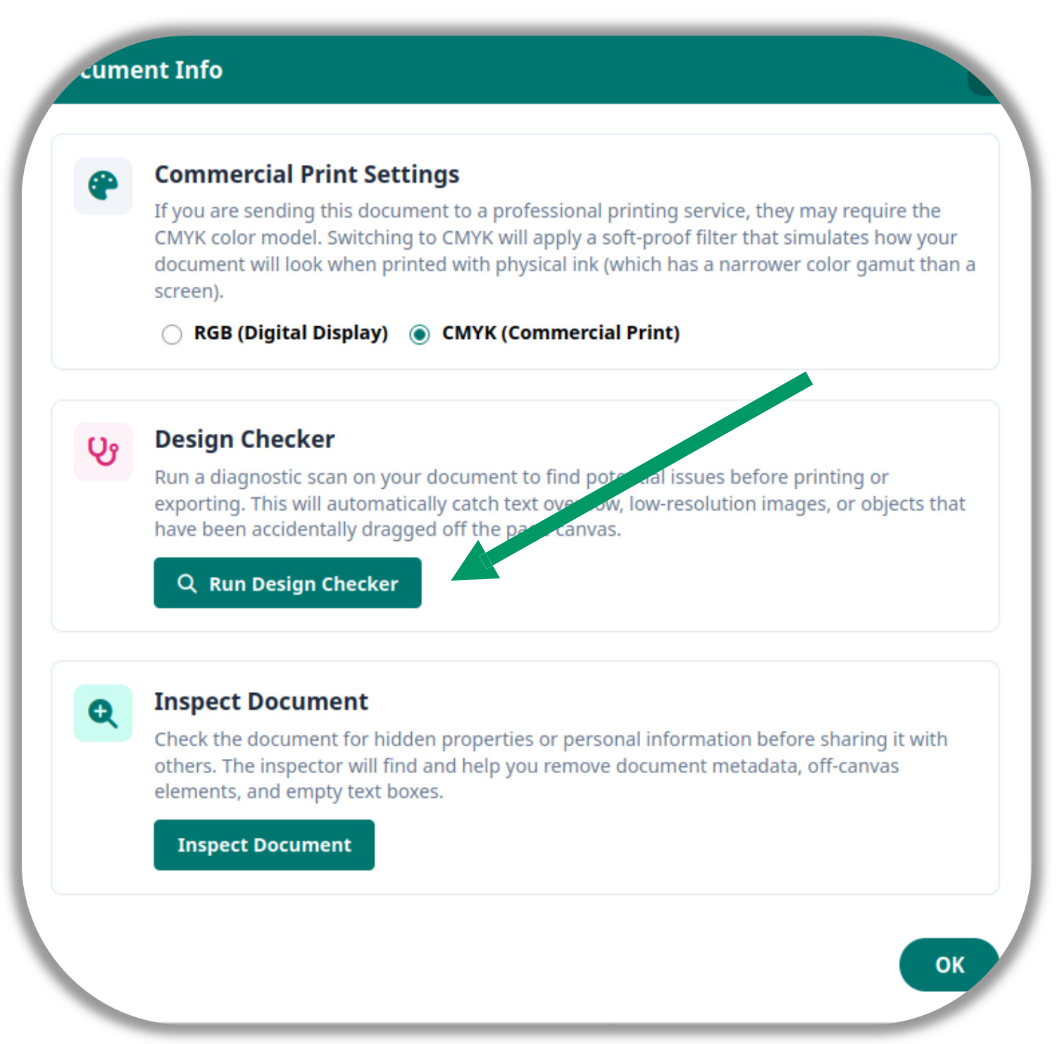
-
Go to File > Info > Run Design Checker.
-
A report is generated listing all flagged issues found across your document.
What It Checks
-
Text Overflow – Text boxes where typed content exceeds the visible box boundary. Any text beyond the boundary would be cut off in the final output without any visible warning on screen.
-
Low-Resolution Images – Images that have been stretched beyond their native pixel dimensions, flagged as a pixelation risk when printed. What looks acceptable on screen can appear blurry or blocky in physical print.
-
Off-Page Objects – Elements that are partially or completely outside the page boundary and would be clipped or absent from the exported or printed output.
Navigating to Issues
Each flagged issue in the report has a crosshair button. Clicking it closes the report, scrolls directly to the problem element, selects it, and flashes a red highlight around it – so you can locate and fix the issue immediately without having to search for it manually.