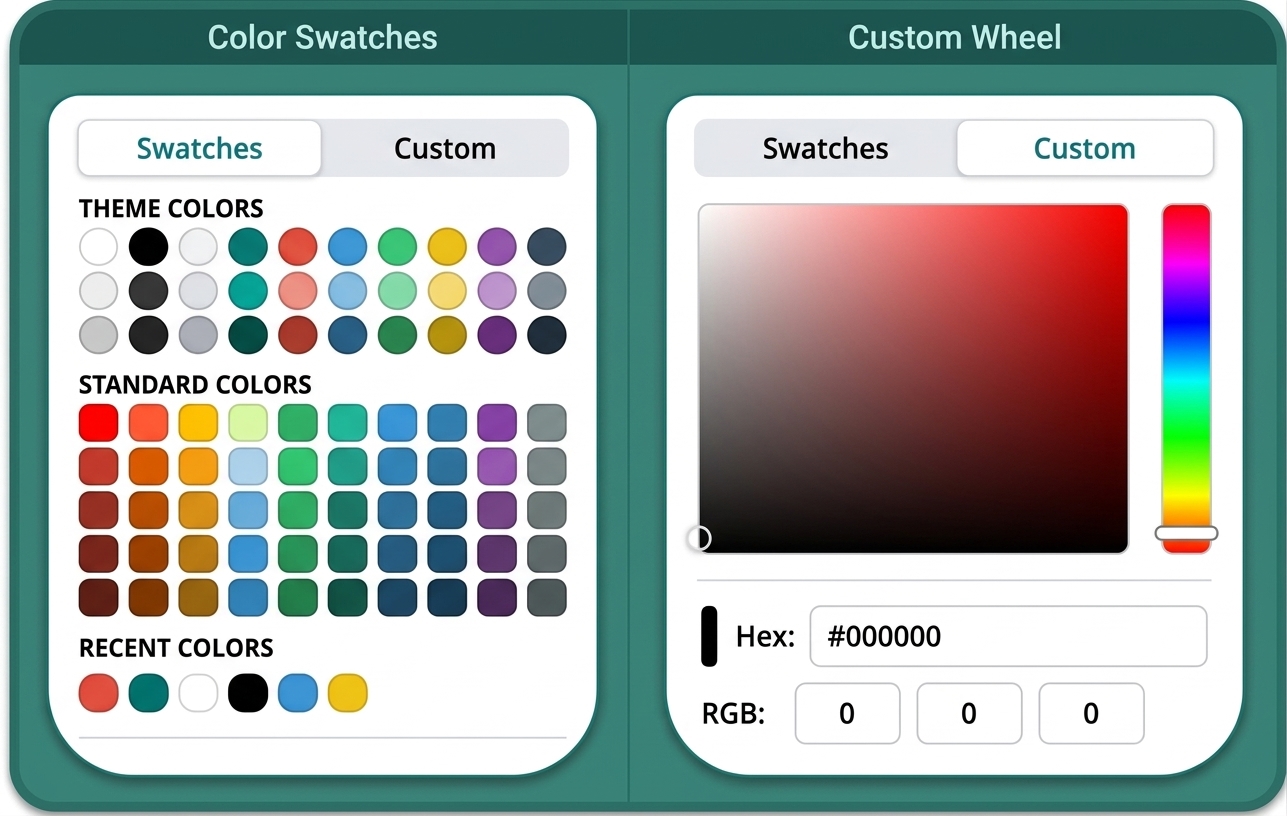
The Custom Colour Picker

Achieving the perfect visual aesthetic requires precise control over your palette. Open Publisher includes a professional-grade custom colour picker, intuitively accessible whenever you need to select a colour for text, backgrounds, geometric shapes, or page borders. Designed to accommodate both rapid prototyping and strict corporate design guidelines, it features a seamless tabbed interface that lets you instantly switch between a library of quick swatches and a full custom colour selection suite.
Eyedropper Tool

An integrated eyedropper tool is built directly into the colour picker interface, functioning as an indispensable asset for cohesive design. Use it to sample any colour currently visible on your screen and instantly apply it as your active selected colour. This is the ideal method for perfectly matching text or background colours to a specific hue found within a client’s logo, an imported reference photo, or an existing design element already sitting on your canvas.
Smart Undo Fallback

Nothing disrupts a creative workflow more than a broken undo function. The colour picker incorporates a sophisticated behind-the-scenes fix for a common browser limitation: normally, pressing Ctrl+Z while actively editing inside a text box would fail to undo broader canvas-level actions (like colour changes) if the browser’s internal text-undo history was empty. Open Publisher intelligently detects this trap and automatically falls back to the main canvas undo function. This ensures that Ctrl+Z always works flawlessly and predictably, reversing your last action regardless of where your cursor is currently focused.